

Available soon
Open lock is an MT5 expert advisor for managing drawdown. It locks losing positions, adds small averaging orders and closes the loss in parts. It needs a hedging account.
Get one message the moment it launches, with its price.
Open lock is a drawdown management expert advisor for MetaTrader 5. Rather than hunting for fresh entries, its main job is to work down an existing losing position by dividing it into smaller pieces and closing each piece once the profit from helper orders can pay for it.
The EA combines three techniques that run side by side on a hedging account.
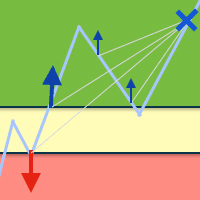
When locking is enabled, the EA opens a counter position against the losing trade. This stops the floating loss from growing while the rest of the process continues.
The EA opens averaging orders in the chosen direction or directions. These use a small lot so they do not put heavy pressure on the deposit. The lot and the distance between orders can both be multiplied as the series grows, and caps can be placed on lot size, number of orders and step.
Profit from the averaging orders is used to close a slice of the losing position. You choose the lot to close and the profit to be gained from each closing step. The EA can target every losing order or a single order identified by its ticket.
Open lock can be started immediately or only after the drawdown reaches a level you set in deposit currency. It can also stop other advisors at that point, either by closing charts of the same symbol or by closing all other charts. In the closing-only mode, another EA opens the trades and Open lock only closes and locks them, and it handles only orders carrying its own magic number.
The EA acts on the symbol of the chart it is attached to, so you can use it on whichever instrument holds the losing position. It is not built around a particular timeframe because the spacing between orders is set in pips. Spreads, swaps, minimum lot and margin rules differ between brokers and instruments, so check them before use.
| Group | What it controls |
|---|---|
| Magic number | Identifier for the averaging orders; it must differ from other EAs |
| Trading mode | Open and close orders, or only close orders opened by another EA |
| Start work | At startup, or after a drawdown level in deposit currency |
| Stop another advisors | Off, close same-symbol charts, or close all other charts |
| Lot and step | First lot, optional lot multiplier, step in pips, optional step multiplier |
| Limits | Maximum averaging lot, maximum orders per direction, maximum step |
| Direction | Buy and sell, buy only or sell only |
| Close orders | All unprofitable orders, or one order by ticket, with close lot and close profit |
| Time to open orders | All the time, or a window by hour from 0 to 23 |
| Settings source | Control panel or expert inputs (use inputs on a VPS) |
The vendor does not give recommended values for every field here, so review each one against your account size and instrument before going live.
You can set an action for a critically low equity level: do nothing, lock all positions and stop, or close all positions and stop. The trigger can be an equity level in currency or a percentage. The action activates 30 seconds after the limit is reached. With no action chosen, the drawdown figure is only shown on the panel.
Trading carries risk, and past results do not predict future ones. Averaging and locking can tie up margin and may not recover a position. Test on a demo account and only use money you can afford to lose.
On start, the EA opens a deal and tries to close it at a profit, which is a quick way to confirm it is running on a demo account. Buttons on the control panel let you add market orders manually.
| Product type | Expert advisor (drawdown management) |
|---|---|
| Platform | MetaTrader 5 |
| Strategy focus | General |
| Delivery | Download from your account after purchase |
| License key | Not needed |
| Status | Launching soon |
| Account type | Hedging account required |
| Markets | Works on the symbol of the chart it is attached to; check your broker |
| Timeframes | Not tied to one timeframe; the step is set in pips |
| Trade style | Locking, averaging and partial closing of losing orders |
| Directions | Buy and sell, buy only, or sell only |
| Configuration | Control panel or expert inputs |
No reviews yet. Customers who own Open lock MT5 can review it here.
No. The algorithm relies on counter positions and many open positions on the same symbol, so a hedging account is required. Check the account type with your broker before buying.
Yes. In the mode that only closes orders, another EA opens the trades and Open lock handles them. You can also start Open lock after a chosen drawdown in deposit currency and have it stop the other expert by closing its chart or all other charts. Make sure the magic number of Open lock differs from the magic numbers of your other EAs.
This listing is for MetaTrader 5. It will not load in MetaTrader 4. Check the store for a separate MT4 edition if you need one.
Yes. Choose the expert inputs mode for the settings, because the control panel is not practical on a remote or hosted terminal. Set every value in the inputs window before you start.
No. It is a tool for managing an existing drawdown, and it can still fail to recover a position, particularly in a strong one-way market or with low free margin. Trading carries risk and past results do not predict future ones.
Test the settings on a demo account first. Review the lot size, step, maximum number of averaging orders and the equity limit action, and confirm your broker allows hedging and your symbol's trading hours.
Open lock MT5
Notify me at launchQuestions about this tool?
Ask us on Telegram Install guide for MT4 and MT5 Get a custom version builtFree, practical help with testing, sizing and running expert advisors.
More MT5 tools with a similar focus.











Own Open lock MT5? Sign in to review it.