

Available soon
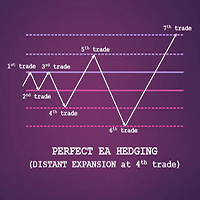
Perfect EA Hedging is an MT5 expert advisor that trades a hedging grid and widens the gap between orders after the first three trades if the market stays range-bound. It is meant to limit how many positions open in sideways conditions.
Get one message the moment it launches, with its price.
Perfect EA Hedging is an expert advisor for MetaTrader 5 that trades a hedging strategy with a built-in way of adjusting its order spacing. Its main idea is to avoid piling up trades when the market moves sideways, which is where simple hedging systems tend to run into trouble.
Classic hedging systems open a position, then place an opposite order at a set distance. When the losing side is hit, the next order usually comes in with a larger lot size so that one winning leg can close the whole basket at or above break-even. The weakness is the spacing. If it is too tight, a ranging market keeps triggering new orders and the lot size climbs. If it is too wide, price may need a very large move before the basket can close, and the account may not have the margin to wait.
This EA tries to sit between those two cases. It observes the first three trades with the same distance. If the market is still moving sideways, it can lengthen the distance from the fourth trade onward. The intention is to keep the number of trades lower during a range, which also limits how often the lot multiplier is applied.
The description available to us does not name specific symbols or a required timeframe. Test the EA on the instruments you plan to trade, and compare results across more than one timeframe, using your own broker's data and spreads. Pairs and symbols with wide spreads or large overnight swaps can behave very differently from those with tight costs.
Exact parameter names and defaults can differ, so open the Inputs tab after attaching the EA and read each field before trading. Areas to check include:
| Area | What to check |
|---|---|
| Initial lot size | Keep it small relative to your balance |
| Lot multiplier | Higher values increase exposure quickly |
| Order distance | The spacing used for the first three trades |
| Distance increase | How the spacing changes from the fourth trade |
| Profit target or break-even handling | How the basket is closed |
| Magic number | Use a unique value if other EAs run on the account |
Trading carries risk and past results do not predict future ones. Hedging with a lot multiplier can lead to large drawdowns or the loss of the whole account. Test on a demo account first and never trade money you cannot afford to lose.
For continuous operation, many traders run the terminal on a VPS so that a lost connection or a restart does not leave open positions unmanaged.
| Product type | Expert Advisor |
|---|---|
| Platform | MetaTrader 5 (expert advisor, .ex5) |
| Strategy focus | General |
| Delivery | Download from your account after purchase |
| License key | Not needed |
| Status | Launching soon |
| Category | Expert advisor |
| Trade style | Hedging with lot multiplier and adaptive spacing |
| Markets | Check the product page and test on your own symbols |
| Timeframes | Check the inputs and test before running live |
| Account type | Hedging-mode account recommended; confirm with your broker |
| Minimum deposit | Not stated; test to find a suitable balance |
| Requirements | Algo trading enabled; stable connection or VPS |
No reviews yet. Customers who own Perfect EA Hedging can review it here.
No. This product is built for MetaTrader 5 and is supplied as an .ex5 file, which MT4 cannot load. If you use MT4, you need a version made for that platform.
A hedging strategy needs the broker to allow opposite positions on the same symbol, which on MT5 normally means an account in hedging mode. Netting accounts merge positions, which can change how the EA behaves. Ask your broker which mode your account uses before you run it.
It starts with the same distance between orders for the first three trades. If the market is still ranging, it can increase the distance from the fourth trade. The aim is fewer trades, and so fewer lot size increases, while price moves sideways. It does not remove the risk of a losing sequence.
The exact defaults are not listed here, so open the Inputs tab after attaching the EA and read each parameter. Run the Strategy Tester on your broker's data first, then try a demo account with small lot sizes before considering a live account.
Copy the file into the MQL5/Experts folder through File, Open Data Folder in MetaTrader 5, then refresh the Navigator or restart the terminal. Drag the EA onto a chart and make sure algo trading is switched on.
Any lot multiplier or hedging approach can build large exposure in a strong trend. Trading carries risk and past results do not predict future ones. Only use money you can afford to lose and monitor the account regularly.
Perfect EA Hedging
Notify me at launchQuestions about this tool?
Ask us on Telegram Install guide for MT4 and MT5 Get a custom version builtFree, practical help with testing, sizing and running expert advisors.
More MT5 tools with a similar focus.











Own Perfect EA Hedging? Sign in to review it.