

Available soon
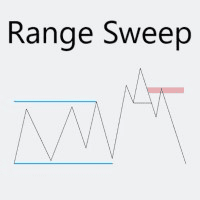
Time Range Sweep EA is an MT5 expert advisor that marks the high and low of a chosen time range, waits for a liquidity sweep and a market structure shift, then places an order on a fair value gap.
Get one message the moment it launches, with its price.
Time Range Sweep EA is an expert advisor for MetaTrader 5 that automates a well-known session-based pattern: price runs through the high or low of a defined time range, takes the resting liquidity, shifts structure in the opposite direction and leaves a fair value gap behind. The EA looks for that sequence and places an order at the gap.
The logic follows a fixed order of events. Each step must complete before the next one is considered.
Orders placed during the trading window but not filled are cancelled automatically when the window closes, so stale orders are not left on the book.
You can set a minimum gap size in ticks for the gap to count as valid. You can also choose a gap size above which the EA enters at the middle of the gap rather than at its edge. When three gaps appear in a row, the EA can enter at the middle of the second one, and you can tell it to skip setups where more than three gaps appear in a row.
The EA is not limited to one instrument. It can be attached to any symbol your broker provides, and to several charts at once, each with its own time range and trading window. You choose the chart timeframe. Session times are interpreted in broker server time, so check your broker's time offset before choosing a range.
Exact input names and defaults can differ by build, so review the inputs tab after loading the EA. The main groups are listed below.
| Group | What it controls |
|---|---|
| Time range | Start and end of the range whose high and low are marked |
| Trading time | Window in which orders may be placed |
| Risk | Percent of account, fixed lot or risk in account currency |
| Stop loss limits | Minimum and maximum stop size in ticks |
| Spread allowance | Ticks added to entry and stop prices |
| FVG rules | Minimum gap size, middle entry threshold, handling of multiple gaps |
| Take-profit | Target set as a risk-to-reward multiple |
| Breakeven | Move the stop to entry after a chosen reward multiple |
| Appearance | Colours for long and short gaps, lines and the trading window |
Stop distance and risk per trade interact with the stop limits you set, so a setup that does not fit your minimum or maximum stop may be skipped or sized differently. Check lot sizing on a demo account for each symbol, as tick value and contract size vary between brokers.
Trading carries risk and you can lose part or all of your capital. Backtest results and screenshots show how a set of inputs behaved in the past, and past results do not predict future ones. Test on a demo account first.
Before going live, run the Strategy Tester with tick-based modelling on the symbol and times you plan to use, and compare it with forward testing on a demo account.
| Product type | Expert Advisor |
|---|---|
| Platform | MetaTrader 5 |
| Strategy focus | General |
| Delivery | Download from your account after purchase |
| License key | Not needed |
| Status | Launching soon |
| Category | Expert advisor |
| Trade style | Intraday liquidity sweep with fair value gap entry |
| Markets | Any symbol available at your broker |
| Timeframes | Any chart timeframe you select |
| Entry logic | Range sweep, market structure shift, fair value gap |
| Risk options | Percent of account, fixed lot or money risk |
| Requirements | Algo trading enabled; a VPS is optional but useful |
No reviews yet. Customers who own Time Range Sweep EA can review it here.
This listing is the MetaTrader 5 build and will not run on MT4. The same strategy idea has been offered for MT4 as a separate product, so check the store catalogue for that version if you need it.
The EA is not tied to one instrument. You can attach it to forex pairs, indices, metals or other symbols your broker offers, and pick the chart timeframe and the time range yourself. Because spreads, session hours and tick sizes differ between symbols, test each one before trading it live.
Yes. Attach it to a separate chart for each symbol and give every chart its own time range and trading window. Make sure each instance uses a distinct magic number if the settings offer one, and keep an eye on the combined risk across all open trades.
The EA is designed to cancel an order that was placed during the trading window but never filled once that window ends. Confirm this behaviour in the Strategy Tester with your own settings before using it on a live account.
Copy the EA file into the Experts folder via File, Open Data Folder, MQL5, Experts in MetaTrader 5, then restart the terminal or refresh the Navigator. Drag the EA onto a chart and make sure algo trading is switched on in the toolbar and in the EA properties.
No. Trading carries risk, you can lose money, and past or backtested results do not predict future ones. Test on a demo account first and size risk to an amount you can afford to lose.
Time Range Sweep EA
Notify me at launchQuestions about this tool?
Ask us on Telegram Install guide for MT4 and MT5 Get a custom version builtFree, practical help with testing, sizing and running expert advisors.
More MT5 tools with a similar focus.











Own Time Range Sweep EA? Sign in to review it.