

Available soon
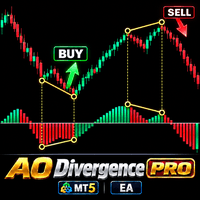
An MT5 expert advisor that looks for divergence between price and the Awesome Oscillator and opens trades in the direction of the expected reversal. It includes many stop, take-profit and risk options and works on gold, forex, stocks, crypto and futures.
Get one message the moment it launches, with its price.
Awesome Oscillator Divergence PRO is an expert advisor for MetaTrader 5 that trades a single idea: when price and the Awesome Oscillator (AO) disagree, momentum may be fading and a reversal may follow. The EA detects those disagreements, opens trades, and then manages them with a large set of stop, target and risk tools.
The Awesome Oscillator is the difference between a 5-period and a 34-period simple moving average, both calculated on the median price of each bar, which is the high plus the low divided by two. These periods are fixed in this EA, so there are no oscillator inputs to adjust.
Signals can be combined with optional confirmation methods and protection filters, so you can ask for more evidence before a trade is opened. Orders can be placed as market, stop or limit orders. You can also reverse the signal direction, reverse a position after a stop-loss, and add positions with or against the trend.
The EA can be attached to any instrument in your MT5 terminal. It is also tagged for gold (XAUUSD), where momentum swings are common, but it is not limited to it. Any timeframe can be used. Lower timeframes produce more signals and more noise, while higher ones produce fewer, slower signals. Test your chosen symbol and timeframe with your own broker data.
The exact list of inputs is long and may change between updates, so open the input tab after attaching the EA and read the help text for each group. The table below shows the main areas to review.
| Area | What to check |
|---|---|
| Money management | Choose the lot mode and confirm the volume suits your balance |
| Stop-loss and take-profit | Select the method and distances, and decide on trailing |
| Confirmation and filters | Decide how many extra checks a signal must pass |
| Risk limits | Set loss and profit limits and the risk mode |
| Schedule | Limit trading to the sessions you want |
| Order mode | Real or virtual orders; market, stop or limit |
The external panel works only in the Strategy Tester with visualization on, and not during optimization. Tick the visual mode option, press Start, adjust the parameters with the spin arrows, then click the orange button to begin the test. Right-clicking a field opens help text.
Trading carries risk, and you can lose some or all of your deposit. Past results, including tester results, do not predict future ones. Divergence signals can fail in strong trends, and features such as adding to positions or increasing volume can raise exposure. Test on a demo account first.
| Product type | Expert Advisor |
|---|---|
| Platform | MetaTrader 5 (expert advisor) |
| Strategy focus | Gold or XAUUSD, Signals, Trend, Momentum |
| Delivery | Download from your account after purchase |
| License key | Not needed |
| Status | Launching soon |
| Category | Expert advisor with signal logic and trade management |
| Core signal | Divergence between price and the Awesome Oscillator |
| Markets | Gold (XAUUSD), forex, crypto, stocks, futures |
| Timeframes | Any chart timeframe; test to find what suits your symbol |
| Trade style | Momentum and trend-reversal entries, standard or multi mode |
| Order types | Market, stop and limit |
| Requirements | MT5 terminal with Algo Trading enabled; any account type |
No reviews yet. Customers who own Awesome Oscillator Divergence PRO can review it here.
No. This is an MT5 expert advisor and will not load in MetaTrader 4. If you trade on MT4, look for a separate MT4 product.
The EA can be attached to any symbol offered in your MT5 terminal, including gold, forex pairs, stocks, crypto and futures. It also runs on any timeframe. Because the oscillator periods are fixed, the timeframe you pick changes how often divergences appear, so test several on your own broker data before using real money.
No. The oscillator is built from fixed 5 and 34 period moving averages of the median price, so it has no period inputs. Your tuning happens in the filters, confirmation options, stops, targets and risk settings.
Yes. The external control panel is available in the tester, but only in visual mode and not during optimization. In the tester the panel's number fields respond to the spin arrows rather than the keyboard. When optimizing, use the standard tester input settings instead.
It is designed to work with different account types. Broker rules such as minimum stop distance, lot step, spreads and hedging or netting mode still apply, so check these with your broker and test on a demo account first.
No fixed figure is given here. The suitable balance depends on the symbol, lot size, stop distance and risk mode you choose. Test on a demo account and size positions so that a losing run would not be a problem for you.
Awesome Oscillator Divergence PRO
Notify me at launchQuestions about this tool?
Ask us on Telegram Install guide for MT4 and MT5 Get a custom version builtFree, practical help with testing, sizing and running expert advisors.
More MT5 tools with a similar focus.











Own Awesome Oscillator Divergence PRO? Sign in to review it.