
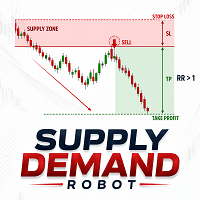

Available soon
Supply Demand Robot MT5 is an expert advisor that trades price reactions at supply and demand zones, with stop loss, take profit and risk-based lot sizing on each trade. It is aimed at H1 charts on major forex pairs and gold.
Get one message the moment it launches, with its price.
Supply Demand Robot is an MT5 expert advisor that trades price reactions at supply and demand zones. It looks for areas where price has turned sharply before, waits for a reversal pattern inside those areas, and opens a trade with a preset stop loss and take profit.
The strategy is pure price action. Zones are drawn from significant highs and lows across different timeframes and act as support and resistance. When price enters a supply zone and forms a bearish pattern, the EA marks a sell signal and opens a short trade. Inside a demand zone, a bullish pattern leads to a buy.
The EA has a recovery system that can raise the lot size after a losing trade, plus a moving average trailing stop to let winning trades run. Increasing size after losses raises exposure, so treat this feature carefully and test it before using it on a live account.
The developer suggests H1 and symbols such as EURUSD, USDJPY, AUDUSD and XAUUSD. Other symbols may work, but spreads, swaps and trading hours vary by broker, so run your own tests.
The inputs below are the main areas you can adjust. Exact names, defaults and ranges depend on the build you install, so read the input tab before running it.
| Area | Purpose |
|---|---|
| Risk percentage | Share of balance risked per trade, used for lot calculation |
| Moving average filter period | Filters signals and supports the trailing stop |
| Recovery lot multiplier | Controls lot increase after a loss, if recovery is enabled |
| Trailing stop | Moves the stop as the trade progresses |
| Trade lifetime | Closes trades that stay open beyond a set time |
Trading carries risk and you can lose money. Past results, including any shown in backtests or set files, do not predict future ones. Test on a demo account first and use a risk percentage you can afford.
For continuous operation, many users run the EA on a VPS. Use the Strategy Tester to check behaviour with your broker's data before going live.
| Product type | Expert Advisor |
|---|---|
| Platform | MetaTrader 5 (expert advisor) |
| Strategy focus | Gold or XAUUSD, Signals, Grid, Support and resistance |
| Delivery | Download from your account after purchase |
| License key | Not needed |
| Status | Launching soon |
| Category | Expert advisor, price action |
| Strategy | Supply and demand zones, support and resistance |
| Markets | Forex majors and gold (XAUUSD) |
| Timeframe | H1 suggested by the developer |
| Trade management | Stop loss, take profit, trailing stop, trade lifetime exit |
| Money management | Automatic lot size from risk percentage |
| Requirements | MT5 account that allows expert advisors; VPS recommended |
No reviews yet. Customers who own Supply Demand Robot MT5 can review it here.
No. This product is built for MetaTrader 5 and will not load in MT4. Check that your broker offers an MT5 account before you buy.
Open MT5, choose File and then Open Data Folder, and copy the expert file into MQL5/Experts. Restart the terminal or refresh the Navigator, drag the EA onto a chart, and enable Algo Trading. Review the inputs before you start.
The developer points to H1 and to pairs such as EURUSD, USDJPY, AUDUSD and gold. Symbol names and spreads differ between brokers, so test on a demo account with your own broker first.
The developer describes the base strategy as one trade at a time with a fixed stop loss and take profit. It does include a recovery option that can raise lot size after a loss, which increases risk. Review that setting and consider keeping the multiplier low or turning it off.
Yes. Risk percentage, moving average filter period, recovery lot multiplier and trailing stop options can be adjusted and tested in the MT5 Strategy Tester. Check the input names and any provided set files after installing.
There is no universal figure. Check your broker's minimum lot size, leverage and margin requirements, and make sure your chosen risk percentage can be applied with the smallest lot your broker allows.
Supply Demand Robot MT5
Notify me at launchQuestions about this tool?
Ask us on Telegram Install guide for MT4 and MT5 Get a custom version builtFree, practical help with testing, sizing and running expert advisors.
More MT5 tools with a similar focus.







Own Supply Demand Robot MT5? Sign in to review it.