

Available soon
An MT5 expert advisor that opens trades when three moving averages line up in order and are spaced apart by a set distance. It can scan several symbols from one chart and offers filters, supply and demand zones and risk-based lot sizing.
Get one message the moment it launches, with its price.
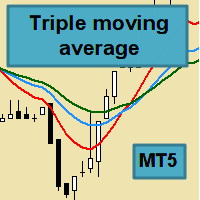
Triple Moving Average EA is an expert advisor for MetaTrader 5 that trades a classic trend-following idea: it waits until three moving averages sit in consecutive order and are separated by a minimum distance, then opens a position in that direction.
The main entry rule checks the order of three moving averages. In an uptrend the fastest sits above the middle one, which sits above the slowest; in a downtrend the order is reversed. A distance condition between the lines helps screen out moments when the averages are bunched together. You choose the periods and type of each average, so the same logic can be adapted to different combinations, including the 10, 20 and 30 periods on a daily chart that some traders follow.
Other entry modes are available if you prefer them:
The logic suits H1 and higher timeframes and is treated as a long-term approach. Expect few trades and the possibility of several poor months in a row. The EA can handle many symbols from one chart, selected from Market Watch, from an input list, or from preset files chosen in a dialog or read from a folder. When presets are used, only some settings are taken from the file and the rest come from the EA inputs, so check the documentation to see which ones.
| Group | What it controls | What to check |
|---|---|---|
| Moving averages | Periods, method and price for the three lines | Match them to your chosen timeframe |
| Distance | Minimum spacing between the lines | Test values per symbol, since price scales differ |
| Money management | Fixed lot or risk percentage | Confirm lot limits with your broker |
| Filters | Spread, time, news and indicator filters | Enable only those you understand |
| Multi-symbol | How the symbol list is built | Confirm symbol names match your broker |
Trading carries risk and past results do not predict future ones. Cost averaging and reverse modes can raise drawdown. Test on a demo account and in the strategy tester before trading live, and only risk money you can afford to lose.
Make sure your account is a hedging account, and do not attach the EA to renko or range charts.
| Product type | Expert Advisor |
|---|---|
| Platform | MetaTrader 5 (hedging account required) |
| Strategy focus | Support and resistance |
| Delivery | Download from your account after purchase |
| License key | Not needed |
| Status | Launching soon |
| Category | Expert advisor |
| Core logic | Triple moving average alignment with minimum spacing |
| Timeframes | Designed for H1 and higher |
| Markets | Forex symbols; multi-symbol mode from one chart |
| Trade style | Long-term, low trade frequency |
| Position sizing | Fixed lot or percentage of risk |
| Not supported | Netting accounts, renko and range charts |
No reviews yet. Customers who own Triple Moving Average EA MT5 can review it here.
No. This product is built for MetaTrader 5 only. If you use MetaTrader 4, you need a version made for that platform.
It needs a hedging account. It does not work on netting accounts, so check your account type with your broker before you buy. It also does not run on renko or range charts.
Triple moving average logic is slow by design, so trade frequency is low and there can be long stretches without a signal or with losing trades. It is not meant for traders who want frequent entries. Actual frequency depends on your symbol, timeframe and settings.
Yes. The EA can work through all symbols in Market Watch, symbols you list in an input, symbols from preset files you pick in a dialog, or preset files in a folder you specify. Supply and demand zones are not available in multi-symbol mode.
Yes. Run it on a demo account first and let it complete a reasonable number of trades, then check your setup in the strategy tester. Trading carries risk and past results do not predict future ones.
Do not assume so. Default inputs are provided, but you should check and adjust the settings for your broker, symbol and risk tolerance. Review the product documentation for the meaning of each input.
Triple Moving Average EA MT5
Notify me at launchQuestions about this tool?
Ask us on Telegram Install guide for MT4 and MT5 Get a custom version builtFree, practical help with testing, sizing and running expert advisors.
More MT5 tools with a similar focus.










Own Triple Moving Average EA MT5? Sign in to review it.