

Available soon
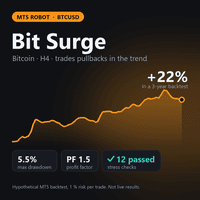
Bit Surge is an MT5 expert advisor that trades Bitcoin (BTCUSD) on the H4 chart. It looks for pullbacks inside a trend during New York hours and sizes each trade from a risk percentage you set.
Get one message the moment it launches, with its price.
Bit Surge is an expert advisor for MetaTrader 5 that trades Bitcoin against the US dollar on the H4 timeframe. It follows the prevailing trend, entering on pullbacks rather than chasing breakouts, and it does so during New York trading hours.
The EA reads signals from closed H4 bars only, so a trade is not opened or cancelled because of a price spike inside an unfinished candle. When the trend direction is established, it looks to buy dips in an uptrend and sell rallies in a downtrend. It holds one position at a time, and every trade is opened with a stop loss attached.
The lot size is not fixed. The EA calculates it from the risk percentage you enter and the distance to the stop loss, so a wider stop means a smaller lot. If the smallest lot your broker allows would risk more than your setting, the EA skips that trade instead of overriding your limit. Because Bitcoin stops are wide, this matters on small accounts.
The EA identifies its own trades by a magic number and only manages those, so it should not interfere with orders you place by hand or with other advisors on the same account, provided each uses a different magic number.
Trade frequency is low because signals appear only on closed H4 bars and only one position is open at a time. Expect long periods without activity.
The developer recommends starting with the default inputs. Input names and ranges can differ between releases, so read the list in the terminal when you attach the EA and check the product page for current details.
| Input type | What it controls | Advice |
|---|---|---|
| Risk per trade | Percentage of equity risked from entry to stop loss | Keep the default until you have tested on demo |
| Magic number | Identifies the EA's own orders | Use a unique value per chart or account |
| Session filter | Hours in which new trades may open | Match it to your broker's server time |
Stop losses limit the loss on each trade, but they do not remove risk. Bitcoin can gap, widen spreads and slip past stop levels, especially around news or when liquidity is thin. Losing streaks happen with any trend-following approach, and results shown in simulations ignore real slippage, liquidity and emotions.
Trading leveraged products carries a high risk of loss and is not suitable for everyone. Past and simulated results do not predict future results, and no profit is promised. Test on a demo account before using real funds.
Before going live, check your broker's Bitcoin contract size, minimum lot, spread and trading hours, and confirm that your account size is compatible with the risk setting you plan to use.
| Product type | Expert Advisor |
|---|---|
| Platform | MetaTrader 5 (expert advisor) |
| Strategy focus | Signals, Trend, Grid |
| Delivery | Download from your account after purchase |
| License key | Not needed |
| Status | Launching soon |
| Category | Expert advisor, automated trading |
| Market | Bitcoin (BTCUSD) |
| Timeframe | H4 |
| Trade style | Trend following, buys dips and sells rallies, signal-based |
| Trading hours | New York session |
| Position handling | One open position at a time, stop loss on every trade |
| Account guidance | Check the product page; a larger balance or a cent account is suggested |
No reviews yet. Customers who own Bit Surge can review it here.
This listing is for MetaTrader 5. An expert advisor compiled for one platform does not run on the other, so use it only in MT5. If you need an MT4 tool, look for a product that is explicitly listed for MT4.
Attach it to a Bitcoin chart (BTCUSD) on H4. The symbol name can differ between brokers, for example with a suffix, so check that your broker offers Bitcoin as a CFD and that the chart uses the H4 timeframe.
The default inputs are the ones the developer tested, so start with them. If you change the risk percentage, do it gradually and test on a demo account first. Check the input list in the terminal for the exact names and meanings.
Bitcoin stop distances are wide, so the smallest lot can risk more than your chosen percentage on a small balance. In that case the EA skips the trade. The developer suggests a larger balance or a cent account; confirm the current guidance on the product page and with your broker's contract specifications.
Download the files from your account, copy the expert advisor into the MQL5/Experts folder via File, Open Data Folder in MT5, then restart the terminal or refresh the Navigator. Drag it onto a BTCUSD H4 chart and enable Algo Trading.
Run it on a demo account for at least two weeks first to confirm it behaves as expected with your broker's spreads, execution and trading hours. Trading carries risk, and past or simulated results do not predict future ones.
Bit Surge
Notify me at launchQuestions about this tool?
Ask us on Telegram Install guide for MT4 and MT5 Get a custom version builtFree, practical help with testing, sizing and running expert advisors.
More MT5 tools with a similar focus.











Own Bit Surge? Sign in to review it.