


Available soon
An MT5 expert advisor that finds trendline-style price boundaries on its own and opens a trade when price closes beyond one. It adds a long-term trend filter, a trailing stop and optional prop firm limits.
Get one message the moment it launches, with its price.
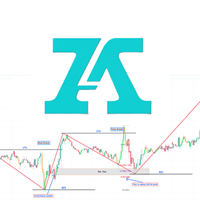
DVN Core Trendline Breakout is an expert advisor for MetaTrader 5 that automates a classic chart idea: price pushes beyond a sloping boundary and the trade follows the break. It locates the boundaries by itself, so you do not draw any lines or prepare the chart.
The EA scans recent price history for swing points where price has turned more than once. When at least two confirmed turning points line up along the same slope, it treats them as a valid boundary. That is either a rising floor or a falling ceiling. It then watches the boundary in real time.
When price closes decisively beyond the boundary, the EA opens a trade in the direction of the break. A second, longer-term direction filter checks the broader market bias first. Entries that go against that bias are skipped.
The EA can be attached to any symbol and any timeframe, including forex pairs, gold and indices. The default inputs are tuned for gold on a medium-term chart, with H1 as the usual starting point. On other instruments, review the inputs and run your own tests, because spreads, volatility and contract sizes differ widely.
Exact input names and defaults can vary, so read the inputs tab after loading the EA. The main groups are listed below.
| Group | What it controls |
|---|---|
| Position sizing | Fixed lot, or lot size calculated from a percentage of balance |
| Stop loss | Fixed distance or swing-point placement |
| Trailing stop | How far price must move before trailing begins, and how closely the stop follows |
| Direction filter | The long-term bias check that blocks counter-trend entries |
| Prop firm mode | Daily loss limit, drawdown cap, profit target halt, news filter, spread guard, daily trade limit |
| Execution delay | Optional random pause between signal and order |
An on-chart panel shows the signal status, the active boundary levels, open position details, session statistics and prop firm progress.
Breakout systems can suffer a string of false breaks when markets range, and spreads or slippage around news can affect fills. Test on a demo account or in the Strategy Tester with realistic tick data before risking capital. Confirm the minimum balance and lot size with your broker, and start with small risk per trade.
Trading carries risk, and you can lose some or all of your capital. Backtests and signal histories do not predict future results, and outcomes depend on your broker, spreads, execution and market conditions.
For continuous operation, run the terminal on a VPS, since the EA only acts while the platform is connected and running.
| Product type | Expert Advisor |
|---|---|
| Platform | MetaTrader 5 |
| Strategy focus | Signals, Trend, Momentum, Breakout |
| Delivery | Download from your account after purchase |
| License key | Not needed |
| Status | Launching soon |
| Category | Expert advisor (automated trading) |
| Strategy | Trendline breakout with trend filter and momentum entry |
| Markets | Any symbol; defaults are tuned for gold (XAUUSD) |
| Timeframes | Any; H1 is the suggested starting point for gold |
| Position sizing | Fixed lot or percentage of balance |
| Account type | Hedging preferred; netting accounts also work |
| Requirements | Algo trading enabled; a VPS is advisable for continuous running |
No reviews yet. Customers who own DVN Core Trendline Breakout can review it here.
It is built for MetaTrader 5 only. It will not load in MetaTrader 4. Install it in the MT5 terminal and attach it to a chart with algorithmic trading enabled.
No. The EA scans recent price history, looks for swing points that line up on the same slope, and treats them as a boundary. It then watches that boundary for a close beyond it. You do not need to prepare the chart.
It can be attached to any symbol and timeframe, but the default inputs are tuned for XAUUSD. For other instruments, review the inputs and test them in the Strategy Tester first. The author may also offer preset files for other symbols, so check the product page or the author's support channel.
It includes optional controls such as a daily loss limit, a total drawdown cap, a profit target halt, a news filter, a spread guard and a daily trade limit. Set them to match your own firm's rules and confirm that automated trading is permitted. Whether a challenge is passed depends on the firm's terms and on market conditions.
A hedging account is the usual recommendation, though netting accounts can also be used. Low spreads and fast execution matter for a breakout system. Check the minimum deposit and the lot size against your broker's contract specifications before going live.
No. Each position is independent and has its own stop loss from the moment it opens. The EA does not add to a losing trade.
DVN Core Trendline Breakout
Notify me at launchQuestions about this tool?
Ask us on Telegram Install guide for MT4 and MT5 Get a custom version builtFree, practical help with testing, sizing and running expert advisors.
More MT5 tools with a similar focus.










Own DVN Core Trendline Breakout? Sign in to review it.