

Available soon
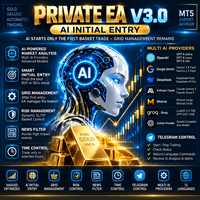
Private EA is an MT5 expert advisor that combines grid trading, an optional RSI entry filter and AI-assisted analysis and basket management using your own API key. It offers four trading modes.
Get one message the moment it launches, with its price.
Private EA is a fully automated expert advisor for MetaTrader 5. It builds on grid trading and adds an RSI-based entry filter, optional AI market analysis and a basket management layer, all selected through four trading modes.
The EA opens positions in a grid and tracks them as a basket. Grid distance can follow market volatility through ATR, with a minimum spacing, and lot sizes can step up in blocks until a maximum lot limit is reached. The four modes decide how entries are chosen.
When enabled, the AI does not only pick the first buy or sell. It can also review an open losing basket at regular intervals. Depending on conditions it may hold, add a recovery position, use opposite-direction exposure, unwind a hedge, or close positions in full or in part. The EA moves through defined states from normal to hedge, locked, unwind, recovery and exit, which is intended to limit uncontrolled stacking of opposing trades. Fixed limits such as maximum lot, trade count and margin checks stay enforced by the EA itself.
The listing does not fix a symbol or a chart timeframe, so test on the instruments you plan to trade. Deep AI analysis can look at D1, H4, H1, M30, M15 and M5 data regardless of the chart you attach it to.
Confirm the exact input names and defaults in the EA after loading it. The main groups are:
| Group | What to check |
|---|---|
| Trading mode | Classic, RSI, AI or Custom |
| AI provider and key | Provider, model and your own API key |
| AI full control | On or off for basket management |
| RSI filter | True or false, plus overbought and oversold levels |
| Grid | ATR-based distance and minimum spacing |
| Lots | Starting lot, block progression, maximum lot |
| Safety | Trade-count limit and margin checks |
Grid and recovery methods can hold losing positions for a long time and may use larger exposure as a basket grows. A lot multiplier in recovery makes this more pronounced. AI output can also be wrong or unavailable if a connection fails.
Trading carries risk, and past results do not predict future ones. Test on a demo account first, keep lot limits conservative and never risk money you cannot afford to lose.
Running the EA on a VPS is advisable so it stays connected while baskets are open.
| Product type | Expert Advisor |
|---|---|
| Platform | MetaTrader 5 (expert advisor) |
| Strategy focus | Trend, Grid, Momentum, Support and resistance |
| Delivery | Download from your account after purchase |
| License key | Not needed |
| Status | Launching soon |
| Category | Expert advisor, fully automated |
| Trade style | Grid and basket management with trend, momentum and RSI logic |
| Markets | Not fixed by the vendor; test on your own symbols first |
| Timeframes | Runs on one chart; AI analysis reads D1 down to M5 |
| Modes | Classic, RSI, AI and Custom |
| AI providers | Several supported, plus OpenAI-compatible custom endpoints |
| Requirements | MT5 account, VPS advised, API key and internet for AI modes |
No reviews yet. Customers who own Private EA can review it here.
No. It is built for MetaTrader 5 only and will not load in MetaTrader 4. Make sure your broker offers an MT5 account before you buy.
Only for the AI mode and AI full control. Classic, RSI and Custom modes use local logic. For AI features you enter your own API key and choose a provider and model. The provider may charge for usage, so check their pricing.
Copy the expert file into the MQL5/Experts folder through File, Open Data Folder in MT5, then refresh the Navigator or restart the terminal. Drag it onto a chart and enable algorithmic trading. For AI modes, also add the provider's web address under Tools, Options, Expert Advisors, Allow WebRequest.
The exact figures depend on your broker, symbol and risk tolerance, so check the input list in the EA and test on a demo account first. Pay close attention to starting lot, maximum lot, trade-count limits and grid spacing, and make sure your deposit can handle the open positions the grid might create.
It is strongly advised. The EA needs to stay connected, monitor baskets and, in AI modes, make regular web requests. A computer that sleeps or loses its connection can interrupt this.
Generally any MT5 broker that allows expert advisors, grids and hedged positions can work, but account type and hedging rules matter. Confirm with your broker and test on a demo account.
Private EA
Notify me at launchQuestions about this tool?
Ask us on Telegram Install guide for MT4 and MT5 Get a custom version builtFree, practical help with testing, sizing and running expert advisors.
More MT5 tools with a similar focus.










Own Private EA? Sign in to review it.