
Available soon
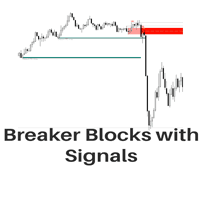
Breaker Blocks is an MT5 indicator that looks for market ranges and structure areas and draws coloured boxes on the chart when price breaks out of them. It can send alerts and notifications when a block forms.
Get one message the moment it launches, with its price.
Breaker Blocks is a chart indicator for MetaTrader 5 that highlights areas where the market has been moving sideways and then marks the breakout from those areas with coloured boxes. It is meant to support price action and technical analysis rather than replace your own judgement.
The indicator scans recent price action for ranges and structure areas, the zones where buyers and sellers were in rough balance. When price leaves one of these zones, it plots a coloured box on the chart so the area is easy to see and refer back to later. You can then compare the box with your own levels, trend view or other tools.
Because the boxes are drawn from price history, they describe what has already happened. They are a visual aid for context and are not a forecast of what price will do next.
The indicator reads standard price data, so it can be attached to forex pairs, metals, indices or other symbols offered by your broker. It can be used on any timeframe. Lower timeframes tend to produce more boxes and more noise, while higher timeframes produce fewer, slower signals. Try several combinations on a demo account to see which fits your style.
The exact list of inputs is shown in the Inputs tab when you attach the indicator, so check it there rather than relying on a fixed list. In general, look for the following groups.
| Group | What to check |
|---|---|
| Detection | Any option that changes how ranges or structures are identified |
| Appearance | Colours and styles for the boxes |
| Alerts | Switches for pop-up alerts and mobile notifications |
Trading carries risk, and past results do not predict future ones. Breakouts can fail, and boxes on a chart do not indicate that a trade will be profitable. Test on a demo account first and only risk money you can afford to lose.
| Product type | Indicator |
|---|---|
| Platform | MetaTrader 5 |
| Strategy focus | Breakout |
| Delivery | Download from your account after purchase |
| License key | Not needed |
| Status | Launching soon |
| Category | Indicator |
| Trade style | Breakout, price action, market structure |
| Markets | Any symbol available at your broker |
| Timeframes | Any chart timeframe; test to find what suits you |
| Output | Coloured boxes on the chart |
| Alerts | Optional alerts and notifications on block formation |
| Requirements | MT5 desktop terminal; push alerts need a MetaQuotes ID |
No reviews yet. Customers who own Breaker Blocks can review it here.
No. It is an indicator that draws boxes and can send alerts. It does not open, manage or close orders, so any entry, stop loss and position size are your own decisions.
This listing is for MetaTrader 5. An indicator built for MT5 will not load in MT4, so check that your terminal is MT5 before you buy.
It draws from the price history on your chart, so it should run on any broker and symbol that MT5 can display. Results look different on each market and timeframe, so review it on a demo chart first.
Enable notifications in the indicator inputs, then enter your MetaQuotes ID in the MT5 desktop terminal under Tools, Options, Notifications. Install the MetaTrader app on your phone and use the same ID there.
Copy the indicator file into the Indicators folder inside your MT5 data folder (File, Open Data Folder, MQL5, Indicators). Refresh the Navigator or restart MT5, then drag the indicator onto a chart.
The indicator offers input settings that you can review when you attach it to a chart. Check the Inputs tab for the exact options, as they may vary, and adjust them to match your charts.
Breaker Blocks
Notify me at launchQuestions about this tool?
Ask us on Telegram Install guide for MT4 and MT5 Get a custom version builtFree, practical help with testing, sizing and running indicators.
More MT5 tools with a similar focus.









Own Breaker Blocks? Sign in to review it.