

Available soon
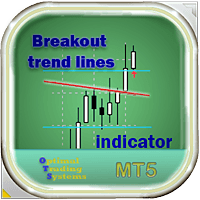
Breakout Trend Lines MT5 is an indicator for MetaTrader 5 that draws horizontal lines at recent highs and lows plus inclined trend lines, then marks a candle close beyond a line with an arrow and optional alerts.
Get one message the moment it launches, with its price.
Breakout Trend Lines MT5 is a chart indicator that marks two kinds of levels: horizontal lines at the high and low of a recent trading range, and sloped trend lines drawn through swing points. When a candle closes beyond one of these lines, it places an arrow on the chart and can send an alert.
The indicator looks back over a set number of bars and finds the highest high and lowest low. It draws a horizontal line at each level. It also looks for swing highs and lows that are far enough apart and joins them to create inclined trend lines, which are drawn in a separate colour.
A signal is given only after a candle has closed beyond a line, not while the candle is still forming. This reduces false marks caused by brief spikes, although it does not remove them. Two shift settings let you require a little extra distance beyond the horizontal range or the sloped line before the arrow is drawn.
The tool reads price data only, so it can be attached to any symbol and timeframe offered by your broker in MT5, including forex pairs, metals, indices and others. Shorter timeframes produce more lines and more signals, and also more noise. Longer timeframes give fewer, slower signals. Try several combinations on a demo account and compare how the lines behave on your own instruments.
The inputs below are available. Default values are shown in the indicator when you attach it, so check them there rather than relying on figures from elsewhere.
| Input | Purpose |
|---|---|
| TradingRange | Number of bars used to find the range high and low |
| Distance | Minimum spacing between highs or lows used for trend lines |
| Shift | Offset used to confirm a break of the horizontal range |
| Shift2 | Offset used to confirm a break of the inclined line |
| EnableAlert | Turns terminal alerts on or off |
| EnablePushNotifications | Sends alerts to the MetaTrader mobile app |
| AddingTextToMessages | Adds your own text to alert messages |
| TrendLinesColor | Colour of the inclined lines |
| HorizontalLinesColor | Colour of the horizontal lines |
A breakout can mean a trend is starting, continuing or simply that price has briefly left a range. Many traders pair the arrows with their own checks, such as higher timeframe direction, support and resistance, or volatility. Decide in advance where you would place a stop and how large a position you would take.
Trading carries risk and you can lose money. Past results do not predict future ones. Breakout signals can fail, and the indicator does not manage trades or protect your capital. Test on a demo account before using any signal on live funds.
For phone alerts, enter your MetaQuotes ID under Tools, Options, Notifications in the terminal.
| Product type | Indicator |
|---|---|
| Platform | MetaTrader 5 |
| Strategy focus | Signals, Trend, Breakout |
| Delivery | Download from your account after purchase |
| License key | Not needed |
| Status | Launching soon |
| Category | Indicator (no automatic trading) |
| Strategy tags | Signals, trend, breakout |
| Markets | Any symbol available in your MT5 terminal |
| Timeframes | Any chart timeframe; test to find what suits you |
| Signals | Chart arrows on candle close, optional alerts |
| Notifications | Terminal alert and mobile push (needs MetaQuotes ID) |
| Requirements | MT5 desktop terminal; no DLL use stated |
No reviews yet. Customers who own Breakout Trend Lines MT5 can review it here.
No. It is a chart indicator. It draws lines and arrows and can send alerts, but it does not place, modify or close orders. You decide whether to act on a signal and how to manage risk.
No. This version is built for MetaTrader 5 only. An MT4 terminal cannot load it, so check which platform your broker account uses before buying.
In MT5 choose File, then Open Data Folder, go to MQL5, then Indicators, and copy the indicator file there. Restart the terminal or refresh the Navigator, then drag the indicator onto a chart.
The trading range setting sets how many bars are used to find highs and lows. Distance sets the minimum gap between points used for trend lines. Two shift settings adjust how far price must move past the horizontal and inclined lines. Alerts, push messages, message text and line colours are also adjustable.
Enable the push notification option in the indicator inputs, and in MT5 enter your MetaQuotes ID under Tools, Options, Notifications. Then install the MetaTrader mobile app and log in with the same ID.
No. A breakout can fail or reverse. Trading carries risk and past results do not predict future ones, so test the settings on a demo account first.
Breakout Trend Lines MT5
Notify me at launchQuestions about this tool?
Ask us on Telegram Install guide for MT4 and MT5 Get a custom version builtFree, practical help with testing, sizing and running indicators.
More MT5 tools with a similar focus.









Own Breakout Trend Lines MT5? Sign in to review it.