

Available soon
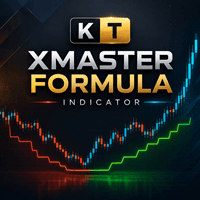
KT XMaster Formula is an MT5 indicator that draws a green or red dotted trend line, marks direction changes with yellow arrows and shows a multi-timeframe dashboard. It can support scalping, pullback or trend-following methods.
Get one message the moment it launches, with its price.
KT XMaster Formula is a trend and momentum indicator for MetaTrader 5. It condenses its calculation into a dotted line that changes colour, arrows that mark a change of direction, and a dashboard that lists the reading on each timeframe.
The calculation combines moving-average smoothing with information derived from RSI and MACD. Instead of placing several oscillators on the same chart, you read one line and a small set of visual cues.
The dashboard shows a Bullish or Bearish reading for timeframes from M1 up to MN1. This lets you see whether a new signal on your working chart agrees with faster and slower timeframes, or whether the wider picture is mixed. You can switch individual timeframes on or off to keep only the ones you use.
The indicator does not trade for you. A common way to read it is as follows:
The indicator can be attached to any symbol and chart timeframe in your MT5 terminal. Short timeframes produce more direction changes and are often used for scalping, while higher timeframes suit trend-following approaches. Spreads, volatility and session timing differ between instruments, so test on a demo account before using it on a live one.
The exact input names and defaults can vary, so open the inputs tab after attaching the indicator and review each field. The main areas are:
| Setting area | Purpose |
|---|---|
| Calculation period | Controls how quickly the line reacts to price |
| Smoothing method | Chooses the type of moving-average smoothing |
| Applied price | Selects which price the calculation uses |
| Dashboard timeframes | Turns each timeframe on or off |
| Alerts | Popup, sound, push notification and email |
Trading carries risk, and past results do not predict future ones. An indicator signal is not a trade instruction. Test any setup on a demo account and size positions according to your own risk limits.
| Product type | Indicator |
|---|---|
| Platform | MetaTrader 5 (MT5) |
| Strategy focus | Scalping, Signals, Trend, Momentum |
| Delivery | Download from your account after purchase |
| License key | Not needed |
| Status | Launching soon |
| Category | Indicator, not an automated trading robot |
| Markets | Any symbol offered by your broker; test on your own instruments |
| Timeframes | Usable on any chart timeframe; dashboard covers M1 to MN1 |
| Trade style | Scalping, signals, trend and momentum, entries made manually |
| Signals | Dotted line colour plus yellow direction-change arrows |
| Alerts | Popup, sound, push notification and email |
| Requirements | MT5 desktop terminal; push and email need setup in the terminal |
No reviews yet. Customers who own KT XMaster Formula MT5 can review it here.
No. It only draws the line, arrows and dashboard on the chart. You decide on entries, stop placement and exits yourself, using your own rules.
No. This version is built for MT5 and will not load in MT4. If you trade on MT4, look for a separate MT4 product instead of trying to use this file.
It runs on the symbols and timeframes available in your MT5 terminal, so there is no specific broker requirement. Results will differ by instrument, spread and session, so test it on a demo account first.
Yes. You can adjust the calculation period, smoothing method and applied price. The dashboard timeframes can be switched on or off one by one. Check the input tab after attaching the indicator for the exact options and defaults.
Enable the push notification option in the indicator inputs, then enter your MetaQuotes ID in the MT5 terminal options under Notifications. Email alerts need your mail server details set up in the Email tab of the same options window.
Behaviour on the current, still-forming candle can differ from closed candles with many indicators. Watch it on a demo chart and compare how arrows look on live and closed bars before relying on it.
KT XMaster Formula MT5
Notify me at launchQuestions about this tool?
Ask us on Telegram Install guide for MT4 and MT5 Get a custom version builtFree, practical help with testing, sizing and running indicators.
More MT5 tools with a similar focus.




Own KT XMaster Formula MT5? Sign in to review it.