

Available soon
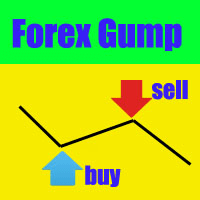
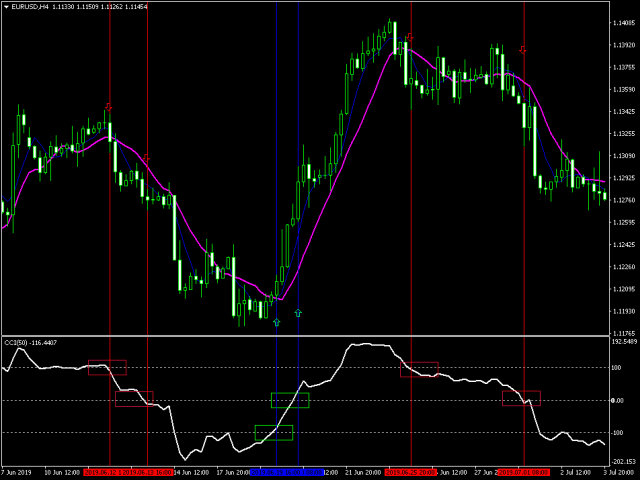
Forex Gump is an MT4 indicator that draws coloured arrows for suggested buy and sell entries and a cross for exits, aimed at trend trading. You place and manage the orders yourself.
Get one message the moment it launches, with its price.
Forex Gump is a signal indicator for MetaTrader 4. It marks suggested entries with coloured arrows and suggested exits with a cross, so you can follow a simple, visual trend routine without building rules from scratch.
Once attached to a chart, the indicator analyses price movement and draws its marks directly on the candles. It does not place orders. You read the signal, then open or close the trade yourself in the terminal.
Because it is built around trend waves, it is meant for traders who prefer to ride a directional move rather than scalp small swings. Like any trend tool, it can produce losing signals when the market moves sideways.
The indicator can be loaded on any forex pair and any timeframe. The developer suggests H1, H4 and D1, where price tends to move more cleanly and the broker spread and swap take up a smaller part of each move. On shorter timeframes costs weigh more heavily, so low-commission accounts and careful demo testing are advisable. If your broker charges high costs, higher timeframes are the more sensible choice.
Four inputs are available. The exact default values are not listed here, so check them in the inputs window after loading the indicator and read any instructions that come with the download.
| Input | Purpose |
|---|---|
| Information | Shows or hides the extra information and logo on the chart |
| Short_Wave | Sets the amplitude of the trend wave the indicator tracks |
| period | Main calculation period of the indicator |
| Period_Ma | Period of the filter applied to the signals |
Change one input at a time and review the result on historical charts. Over-fitting values to a past period rarely carries over to live markets.
An arrow is a suggestion, not a forecast. Use a stop loss, size positions to an amount you can afford to lose, and confirm the behaviour of the signals on a demo account, including whether marks stay in place after a bar closes.
Trading leveraged products carries a high level of risk and you can lose more than you expect. Past results shown on any chart or in any test do not predict future ones. This indicator does not remove that risk.
If nothing appears, make sure the chart has loaded enough history and that automated or indicator settings in the terminal are not blocking it.
| Product type | Indicator |
|---|---|
| Platform | MetaTrader 4 (MT4) |
| Strategy focus | Signals, Trend |
| Delivery | Download from your account after purchase |
| License key | Not needed |
| Status | Launching soon |
| Category | Indicator (semi-automatic signal system) |
| Trade style | Trend following, manual execution from arrow signals |
| Markets | Forex currency pairs; other symbols can be tested on a demo |
| Timeframes | All; H1, H4 and D1 are suggested for less noise |
| Signals | Blue arrow = buy, red arrow = sell, yellow cross = close |
| Inputs | Information, Short_Wave, period, Period_Ma |
| Requirements | MT4 terminal and a chart with enough price history |
No reviews yet. Customers who own Forex Gump can review it here.
No. It is an indicator that draws arrows and crosses on the chart. You decide whether to act on each signal, enter the order manually and set your own lot size, stop loss and take profit. If you want automated execution, you would need a separate expert advisor.
This listing is for MetaTrader 4 only. Do not try to load an MT4 indicator into MT5, because the file formats are not compatible. Check that the product page says MT4 before you buy.
All timeframes can be loaded, but H1, H4 and D1 are the usual starting point because short-term noise is lower and spread and swap take a smaller share of each move. On M1 to M15, costs matter much more, so test carefully on a demo account first.
Open MT4, choose File, then Open Data Folder, go to MQL4, then Indicators, and copy the indicator file there. Restart MT4 or refresh the Navigator, then drag Forex Gump from the Indicators list onto a chart. Allow DLL or automated settings only if the product instructions ask for it.
The developer describes the signals as non-repainting, but you should confirm this yourself. Run the indicator on a demo chart for a while, note where arrows appear on closed bars, and check that they stay in place before using real money.
The inputs are Information, Short_Wave, period and Period_Ma. Start with the defaults that load with the indicator and change one value at a time while watching how the arrows react. Check the product page or included instructions for any recommended values.
Forex Gump
Notify me at launchQuestions about this tool?
Ask us on Telegram Install guide for MT4 and MT5 Get a custom version builtFree, practical help with testing, sizing and running indicators.
More MT4 tools with a similar focus.






Own Forex Gump? Sign in to review it.