


Available soon
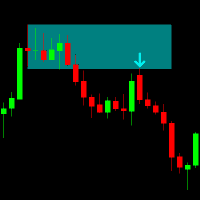
Fvg Hunter is an MT5 indicator that finds three-candle fair value gaps, draws bullish and bearish zones on the chart and can flag candles that close completely through a gap. It also shows centre lines, previous daily closes and a small dashboard.
Get one message the moment it launches, with its price.
Fvg Hunter is a chart indicator for MetaTrader 5 that scans price history for fair value gaps, draws them as shaded zones and can warn you when a candle closes right through one. It does not open or close trades.
The indicator uses a three-candle pattern. A bullish gap appears when the low of the first candle sits above the high of the third candle. A bearish gap appears when the high of the first candle sits below the low of the third. The space between those two prices is drawn as a rectangle and extended to the right by a number of bars that you choose.
Only gaps that pass your minimum size filter are shown, which helps remove the many small gaps that appear on busy charts. The filter can be set in price distance, points or pips, so it can be adapted to currency pairs, metals and indices.
The detection timeframe is an input and does not have to match the chart you are viewing. You could, for example, read gaps from a lower timeframe while looking at a higher one. Because the indicator only reads candles, it can be loaded on any symbol your broker provides in MT5. Check that enough history is available for the timeframe you pick.
The alert is based on a completed candle closing fully through a gap in the opposite direction. For a bullish gap, the candle must be bearish and close below the bottom of the zone. For a bearish gap, the candle must be bullish and close above the top. You can set a separate alert timeframe, a minimum gap height, restrict alerts to the forward range of the zone, limit them to once per gap and show the message on the chart.
| Group | What you can adjust |
|---|---|
| Detection | Timeframe, number of bars scanned, maximum gaps shown, forward bars |
| Direction | Show bullish gaps, show bearish gaps, or both |
| Size filter | Enable the filter, minimum size, unit (price, points or pips) |
| Appearance | Colours, fill and border transparency, fill on or off, border width, draw behind candles |
| Centre line | Show or hide, colour, transparency, width, dash and gap length |
| Close alert | Enable, alert timeframe, minimum height, forward range only, once per gap, show on chart |
Default values are not listed here, so review each input when you first attach the indicator and adjust the size filter to suit the instrument you trade.
Fair value gaps are a way of describing past price action and do not predict what happens next. Trading carries risk, you can lose money, and past results do not predict future ones. Test any approach on a demo account first.
| Product type | Indicator |
|---|---|
| Platform | MetaTrader 5 |
| Strategy focus | General |
| Delivery | Download from your account after purchase |
| License key | Not needed |
| Status | Launching soon |
| Category | Indicator (chart overlay, no automatic trading) |
| Concept | Three-candle fair value gap (FVG) detection |
| Markets | Forex, metals, indices and other CFDs offered by your broker |
| Timeframes | Any; the detection timeframe is set separately from the chart |
| Size units | Price, points or pips |
| Alerts | Close-through alert, optionally shown on the chart |
| Requirements | MT5 desktop terminal with enough chart history loaded |
No reviews yet. Customers who own Fvg Hunter indicator can review it here.
No. This product is built for MetaTrader 5 and will not load in MT4. If you trade on MT4, look for a version made for that platform instead.
No. It is an indicator that draws zones, lines and alerts on the chart. Any decision to enter or exit a trade stays with you, and you should combine it with your own analysis and risk rules.
Yes. The detection timeframe is an input, so you can read gaps from a lower or higher timeframe while looking at another chart. Make sure the terminal has downloaded enough history for the timeframe you pick.
In MT5 choose File, then Open Data Folder, and copy the indicator file into MQL5/Indicators. Restart the terminal or refresh the Navigator, then drag the indicator onto a chart and review its inputs.
Any broker that offers MT5 should work, since the indicator only reads chart data. Symbol names, point values and history depth differ between brokers, so check the size filter on your own instrument.
The alert looks at a completed candle that closes fully beyond a gap in the opposite direction: a bearish candle closing below a bullish gap, or a bullish candle closing above a bearish gap. A simple touch of price does not count.
Fvg Hunter indicator
Notify me at launchQuestions about this tool?
Ask us on Telegram Install guide for MT4 and MT5 Get a custom version builtFree, practical help with testing, sizing and running indicators.
More MT5 tools with a similar focus.



Own Fvg Hunter indicator? Sign in to review it.