

Available soon
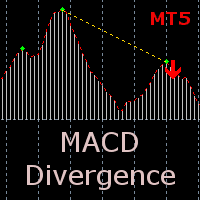
An MT5 indicator that finds divergence between price swings and MACD peaks, marks the signals with arrows in a sub-window, and can send pop-up, email or push alerts. It is a signal tool, not an automated trader.
Get one message the moment it launches, with its price.
MACD Divergence for MT5 is an indicator that compares swing points in price with the matching peaks of the MACD oscillator and marks the places where the two disagree. It is a signal and confirmation tool for manual traders, not an automated trading system.
Divergence appears when price pushes to a new extreme but momentum, as measured by MACD, does not follow it. Many traders read this as a sign that the current move is losing strength. The indicator looks for peaks in the MACD values, compares them with the price at the same points, and reports a signal when the relationship between them is divergent.
Signals are drawn as arrows in the indicator window below the chart. The lines that show which price points and which MACD peaks produced the signal are drawn both on the main chart and inside the indicator window, so you can see why an arrow appeared and judge it yourself.
Three alert channels can be switched on separately:
Email and push alerts need a one-time setup in the terminal options before they will arrive.
The indicator reads the chart it is attached to, so it can be loaded on any symbol and timeframe that your MT5 broker offers, including forex pairs, metals, indices and others. Lower timeframes produce more signals and more noise. Higher timeframes produce fewer signals that take longer to develop. Test which suits your style before relying on it.
| Input | Purpose |
|---|---|
| MacdFast | Period of the fast MACD line |
| MacdSlow | Period of the slow MACD line |
| MacdSignal | Period of the MACD signal line |
| MacdPrice | Price type used to calculate MACD |
| PeakPoints | Number of bars used to detect a MACD peak |
| PeakDistance | Minimum distance between MACD peaks |
| lineColor | Colour of the condition lines on the chart |
| UseAlert | Enables the pop-up alert |
| UseNotification | Enables push notifications |
| UseMail | Enables email alerts |
Larger peak values generally make the indicator more selective, and smaller values make it react to smaller swings. Check the default values shown when you load the indicator and change one input at a time while testing.
Divergence signals can appear early, fail, or repeat while a trend continues. Trading carries risk, and past results do not predict future ones. Use the indicator alongside your own analysis and risk management, and try it on a demo account first.
| Product type | Indicator |
|---|---|
| Platform | MetaTrader 5 |
| Strategy focus | Signals, Momentum |
| Delivery | Download from your account after purchase |
| License key | Not needed |
| Status | Launching soon |
| Category | Indicator (not an expert advisor) |
| Strategy tags | Signals, momentum |
| Markets | Any symbol available in your MT5 terminal |
| Timeframes | Any chart timeframe |
| Output | Arrows in a separate window plus condition lines |
| Alerts | Pop-up, email and push notification |
| Trade style | Manual, divergence-based signal confirmation |
No reviews yet. Customers who own MACD Divergence MT5 can review it here.
No. It only analyzes price and MACD and displays signals and alerts. You decide whether to trade, and you set your own entries, stops and position size.
No. This product is built for MetaTrader 5 and will not load in MT4. Check that your broker gives you an MT5 account before buying.
Turn on UseMail or UseNotification in the indicator inputs. You must also set up email under Tools, Options, Email, and enter your MetaQuotes ID under Notifications in the MT5 terminal. Without that setup, only the pop-up alert will work.
The MACD periods and the peak detection values can all be changed. Start with the values shown when you load the indicator, then test changes on a demo account or in the strategy tester's visual mode on your own symbol and timeframe.
It runs inside the MT5 terminal and uses the price data on your chart, so it is not tied to a particular broker. Symbol names and data history differ between brokers, so check your chart has enough history.
MACD Divergence MT5
Notify me at launchQuestions about this tool?
Ask us on Telegram Install guide for MT4 and MT5 Get a custom version builtFree, practical help with testing, sizing and running indicators.
More MT5 tools with a similar focus.







Own MACD Divergence MT5? Sign in to review it.