

Available soon
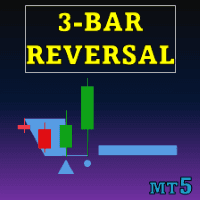
An MT5 indicator that scans the chart for three-bar reversal patterns, marks them visually and can extend the pattern range as support and resistance. Optional trend filters help you keep or exclude patterns that match the current trend.
Get one message the moment it launches, with its price.
Three Bar Reversal Pattern is an MT5 indicator that looks for a well-known three-candle formation and marks it directly on your chart. It can also turn a confirmed pattern into support and resistance levels, and it offers trend filters so you can decide which patterns are worth your attention.
The indicator reads closed bars and checks for a sequence of three. The first two bars show the prevailing direction and normally share the same bias, either bullish or bearish. The third bar is the one that signals a possible change, because it closes against that direction. When the sequence is found, the pattern is highlighted on the chart.
Once a pattern is confirmed and price behaves in line with it, the indicator can extend the pattern boundaries across the chart. The upper edge often acts as a resistance reference and the lower edge as a support reference. This feature can be switched on or off in the inputs, which helps keep the chart tidy.
A reversal pattern means different things depending on the surrounding trend, so the indicator lets you filter by a trend tool of your choice. You can then show only patterns that align with the detected trend, or only those that oppose it.
The indicator works from chart prices, so it can be attached to any symbol and timeframe in MT5, including forex pairs, metals, indices and others your broker provides. Shorter timeframes tend to produce more patterns and more noise, while longer ones produce fewer. Review how it behaves on the symbols and timeframes you actually trade before relying on it.
The exact names and defaults are shown in the input window when you attach the indicator, so check them there. The main groups are listed below.
| Group | What you can set |
|---|---|
| Pattern type | Normal, Enhanced or All |
| Support and resistance | Show or hide levels derived from patterns |
| Trend filter | Aligned or opposite to the trend |
| Moving Average Cloud | Average type, fast period, slow period |
| Supertrend | ATR length and factor |
| Donchian Channels | Channel length |
A pattern marker is not a trade instruction. Reversal formations fail often, especially in strong trends and around news. Use your own stop placement and position sizing, and test any settings on a demo account first.
Trading carries risk, and past results do not predict future ones. This indicator highlights price patterns only and does not remove the possibility of loss.
If nothing appears, make sure indicators are allowed on the chart and that enough price history is loaded for the symbol.
| Product type | Indicator |
|---|---|
| Platform | MetaTrader 5 |
| Strategy focus | Signals, Trend, Support and resistance |
| Delivery | Download from your account after purchase |
| License key | Not needed |
| Status | Launching soon |
| Category | Indicator (chart overlay, no automatic trading) |
| Signal type | Three-bar reversal pattern markers |
| Markets | Any symbol available in your MT5 terminal |
| Timeframes | Any chart timeframe; test the ones you trade |
| Trend filters | Moving Average Cloud, Supertrend, Donchian Channels |
| Pattern modes | Normal, Enhanced, All |
| Requirements | MT5 desktop terminal with chart history loaded |
No reviews yet. Customers who own Three Bar Reversal Pattern MT5 can review it here.
No. It is a chart indicator that marks patterns and optional support and resistance levels. Any entry, exit and position sizing decision stays with you or with your own separate tools.
This listing is for MetaTrader 5 only. A separate MT4 edition exists as its own product, so check that you are choosing the build that matches your platform.
Normal mode does not require the third bar to close beyond the high or low of the first bar. Enhanced mode does require it, which usually gives fewer but stricter patterns. The All setting shows both kinds.
You pick a trend tool (Moving Average Cloud, Supertrend or Donchian Channels) and choose whether to show only patterns that align with its trend or only those that oppose it. Check the input list in the indicator for the exact option names and defaults.
It reads price data from the chart, so it can be attached to any symbol your MT5 broker offers. Pattern frequency and quality vary between symbols and timeframes, so review it on a demo chart first.
Copy the indicator file into the Indicators folder through File, Open Data Folder, MQL5, Indicators in MT5. Refresh the Navigator or restart the terminal, then drag the indicator onto a chart.
Three Bar Reversal Pattern MT5
Notify me at launchQuestions about this tool?
Ask us on Telegram Install guide for MT4 and MT5 Get a custom version builtFree, practical help with testing, sizing and running indicators.
More MT5 tools with a similar focus.









Own Three Bar Reversal Pattern MT5? Sign in to review it.