
Available soon
Trade Info is an MT4 utility that places a compact panel on your chart showing account balance, equity, margin, open risk and profit and loss by day, week, month and year. It does not open or close trades.
Get one message the moment it launches, with its price.
Trade Info is a display utility for MetaTrader 4. It adds a panel to your chart that gathers the main numbers about your account and your trading in one place, so you do not have to keep switching between the Terminal tabs.
Once attached to a chart, the panel reads account data and order history from the terminal and refreshes it as the market moves. It never places or alters orders. It is a read-only view that can sit next to manual trading or any expert advisor.
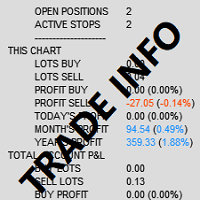
The active stops count is useful if you always use protective stops. If the number of stops is lower than the number of open positions, at least one position has no stop attached.
The panel can show two blocks of figures. The first covers only the symbol of the chart it is loaded on. The second covers the whole account. Each block lists open buy and sell lots, open buy and sell profit or loss, and results for today, this week, this month and this year, in currency and percentage.
The header changes colour when losses for the month exceed gains for the month. This gives a quick visual cue when you are scanning several charts. You can click the panel to minimise it and free up chart space.
Trade Info is not tied to any market or timeframe. It can be loaded on any symbol your broker offers and on any chart period. Because the symbol-level block follows the chart it sits on, load it on the instrument you want to track.
The exact input names and default values can differ, so check the inputs window after loading the file. The options cover the following areas.
| Option | Purpose |
|---|---|
| Font and font size | Change the text style and size to suit your screen |
| What to display | Current and all symbols, current symbol only, or all symbols only |
| Corner and X/Y position | Choose the chart corner and fine-tune the offset |
| Refresh time in seconds | Controls updates, including on offline charts |
| Transparency | Zero is a solid background; higher values make it more see-through |
| Colours | Set the text and header colours |
The panel reports figures; it does not improve or change trading results. The risk value is based on the stops currently set, so positions without stops or with moved stops will change it. Treat the numbers as an aid to your own checks.
Trading carries risk, and past results shown in any panel do not predict future ones. Only trade with money you can afford to lose, and test on a demo account first.
| Product type | Bot or utility |
|---|---|
| Platform | MetaTrader 4 |
| Strategy focus | General |
| Delivery | Download from your account after purchase |
| License key | Not needed |
| Status | Launching soon |
| Category | Utility (information panel) |
| Markets | Any symbol available in your MT4 account |
| Timeframes | Any chart timeframe |
| Trade style | None, display only; works alongside manual or automated trading |
| Panel scope | Current symbol, all symbols, or both |
| Customisation | Font, size, corner, X/Y position, transparency, colours |
| Requirements | MT4 terminal with a live or demo account logged in |
No reviews yet. Customers who own Trade Info can review it here.
No. It is an information panel. It reads your account and trade history and displays the figures on the chart. It does not send, modify or close any orders, so it will not interfere with your own trading or with other expert advisors.
This listing is for MetaTrader 4. An MT4 file cannot be loaded in MT5, so check that your terminal is MT4 before buying. If you use MT5, look for a product that is listed specifically for that platform.
It works with any broker whose account runs on MT4, because it only reads data from the terminal. The figures depend on what your broker reports, such as spread, leverage and trade history, so they may differ slightly between brokers.
The daily, weekly, monthly and yearly figures are built from the account history held in your terminal. In the Account History tab of MT4, set the displayed history to All History so older closed trades are available to the panel.
Copy the file into the MQL4 folder of your terminal (File, Open Data Folder), place it in the Indicators folder, restart MT4 or refresh the Navigator, then drag it onto a chart. Allow it to load and adjust the inputs to taste.
The panel includes a refresh interval in seconds, which is intended to keep it updating on offline charts. Check the input list after loading it and set a sensible interval for your set-up.
Trade Info
Notify me at launchQuestions about this tool?
Ask us on Telegram Install guide for MT4 and MT5 Get a custom version builtFree, practical help with testing, sizing and running expert advisors.
More MT4 tools with a similar focus.







Own Trade Info? Sign in to review it.