

Available soon
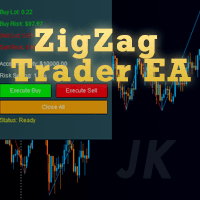
A MetaTrader 5 utility that plots recent ZigZag highs and lows, calculates lot size from a risk percentage, and opens trades from an on-chart panel with stop-loss and take-profit already set.
Get one message the moment it launches, with its price.
ZigZag Trader EA is a utility for MetaTrader 5 that reads the swing highs and lows produced by the ZigZag indicator, shows them on the chart, and helps you place trades around those levels with the position size calculated for you.
The tool builds its own ZigZag reading from the depth, deviation and backstep values you choose. The most recent swing highs and lows are treated as support and resistance. A panel on the chart displays these levels, your account equity, the suggested lot size for a long or short trade, and the amount at risk in account currency.
When you press the long or short button, the EA opens a market order. For a buy, the stop-loss goes at the relevant ZigZag low. For a sell, it goes at the ZigZag high. The take-profit is then set from the risk-reward ratio, so a ratio of 2.0 places the target at twice the stop distance. A close-all button exits the positions that belong to the EA.
The lot size comes from the share of equity you are willing to risk and the distance to the stop. Minimum and maximum lot inputs keep the result inside limits you set. Check the outcome against your broker's lot step and margin rules.
The EA can be attached to any symbol and timeframe in MT5. ZigZag swings are redrawn as price moves, so very short timeframes can produce noisy levels. The author suggests H1 or H4 for steadier swing points. Whether a given instrument suits this approach is something to check on a demo account.
The inputs fall into four groups. The values below are the defaults listed for the product; confirm them in the input window after you attach it.
| Input | Purpose | Default |
|---|---|---|
| ZigZag Depth | Minimum bars for a swing | 12 |
| ZigZag Deviation | Minimum price move for a new swing | 5 |
| ZigZag Backstep | Bars between swing points | 3 |
| ZigZag Buffer Size | Amount of swing data read | 50 |
| Risk Percent | Share of equity risked per trade | 1.0 |
| Risk Reward Ratio | Target distance relative to stop | 2.0 |
| Max / Min Lot Per Trade | Lot size limits | 1.0 / 0.01 |
| Magic Number | Identifies the EA's orders | 2025 |
| Slippage | Allowed slippage in points | 10 |
| Enable Buy / Enable Sell | Turn each direction on or off | On / On |
Panel position, font size and colours can also be changed so the panel does not cover your chart.
A stop-loss placed at a swing point can be far from the entry, which makes the lot size small, or close to it, which makes the lot size large. Slippage and fast markets can fill orders away from the planned price. Choose a risk percentage that fits your account and your tolerance for loss.
Trading carries risk, and you can lose some or all of your capital. Past results do not predict future ones. Test on a demo account first and never risk money you cannot afford to lose.
| Product type | Bot or utility |
|---|---|
| Platform | MetaTrader 5 (MT5) |
| Strategy focus | Signals, Support and resistance |
| Delivery | Download from your account after purchase |
| License key | Not needed |
| Status | Launching soon |
| Category | Utility / trading assistant |
| Strategy tags | Signals, support and resistance |
| Markets | Any symbol available in your MT5 account |
| Timeframes | Any; the author suggests H1 and H4 for steadier swings |
| Trade style | Panel-driven entries based on ZigZag swing points |
| Risk controls | Risk percent, risk-reward ratio, minimum and maximum lot |
| Requirements | MT5 terminal with Algo Trading enabled; demo testing advised |
No reviews yet. Customers who own ZigZag Trader EA can review it here.
No. This build is for MetaTrader 5 only. It will not load in MT4, so check that your broker account runs on MT5 before buying.
The workflow centres on an on-chart panel. It calculates the levels, lot size and risk, and you press the long or short button to send the order. Test on a demo account to confirm exactly how it behaves with your settings and broker.
The EA takes the risk percentage you set, measures the distance from entry to the stop-loss at the ZigZag swing point, and converts that into a lot size. The result is held between the minimum and maximum lot inputs. Always compare the figure with your broker's contract specifications.
It can be attached to any chart. Higher timeframes such as H1 and H4 usually give fewer and more stable swing points than very short ones. Try several on a demo account and see which suits your market.
Copy the downloaded files into the MQL5 folder through File, Open Data Folder in MT5, placing the expert in Experts. Restart the terminal or refresh the Navigator, drag the EA onto a chart and allow Algo Trading.
It should run on any MT5 broker that allows expert advisors, but symbol names, lot steps, spreads and stop levels vary. Check these with your broker and test before using real funds.
ZigZag Trader EA
Notify me at launchQuestions about this tool?
Ask us on Telegram Install guide for MT4 and MT5 Get a custom version builtFree, practical help with testing, sizing and running expert advisors.
More MT5 tools with a similar focus.









Own ZigZag Trader EA? Sign in to review it.