
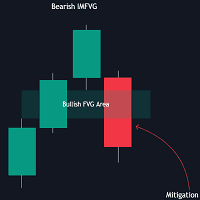

Available soon
An MT5 indicator that finds fair value gaps mitigated one bar after they form and turns each event into a directional signal. It can also draw ATR-based take-profit and stop-loss areas and a trailing stop.
Get one message the moment it launches, with its price.
FVG Instantaneous Mitigation Signals is an MT5 indicator built around one specific price action event: a fair value gap that is filled by price just one bar after the gap appears. When that happens, the indicator marks the gap, draws a reference level and prints a signal on the chart.
A fair value gap is an imbalance in price, a zone where one candle's move left a space that neighbouring candles did not cover. Price often returns to fill such zones, which is usually called mitigation. This tool looks only at the fast case, where the gap is mitigated on the very next bar.
The signal points the opposite way to the gap that was filled. If a bearish gap is mitigated straight away, the indicator shows a bullish signal. If a bullish gap is mitigated straight away, it shows a bearish signal.
Each qualifying gap is highlighted on the chart together with its average level. That level is extended forward until price reaches it from the opposite side of the gap bias, so you can treat it as a possible support or resistance reference alongside your own analysis.
You can switch on take-profit and stop-loss areas. When a new signal appears, each area is drawn from the gap's average level out to a distance set by an ATR multiplier. A larger multiplier places the area further from price, so it needs a bigger move to be reached.
The trailing stop moves in the signal's favour when price makes a new higher high or lower low after the stop was set. A larger multiplier places the starting level further away, which makes it less likely to be touched early but also gives a wider risk distance.
The indicator works from chart prices, so it can be loaded on any symbol and timeframe in your MT5 terminal. Gap size and ATR behave differently on each instrument, so settings that suit one symbol may not suit another. Test on a demo account or in the visual tester before using any signal in live trading.
The inputs are grouped into the gap filter, take-profit and stop-loss areas, and the trailing stop. Default values are not listed here, so check them in the inputs tab when you attach the indicator.
| Setting | Purpose |
|---|---|
| FVG width filter | Hides thinner gaps; higher values keep only more volatile gaps |
| TP area | Turns take-profit areas on or off for new signals |
| TP multiplier | Sets how far the take-profit area sits from price, in ATR units |
| SL area | Turns stop-loss areas on or off for new signals |
| SL multiplier | Sets how far the stop-loss area sits from price, in ATR units |
| Reset trailing stop | Resets on every signal, or only when a signal of the opposite bias appears |
| Trailing stop multiplier | Controls the starting distance of the trailing stop |
Trading carries risk, and past results do not predict future ones. The signals and price areas shown are visual aids, not instructions to trade. Size positions to your own limits and test on a demo account first.
| Product type | Indicator |
|---|---|
| Platform | MetaTrader 5 |
| Strategy focus | Signals, Support and resistance |
| Delivery | Download from your account after purchase |
| License key | Not needed |
| Status | Launching soon |
| Category | Indicator (chart overlay) |
| Approach | Fair value gap mitigation signals |
| Markets | Any symbol available in your MT5 terminal |
| Timeframes | Any chart timeframe; test before relying on one |
| Trade style | Discretionary signal support, price action based |
| Extras | TP/SL areas, trailing stop, FVG width filter |
| Requirements | MT5 desktop terminal; no external DLLs stated |
No reviews yet. Customers who own FVG Instantaneous Mitigation Signals can review it here.
This page covers the MetaTrader 5 indicator. It will not load in MT4, so make sure your terminal is MT5 before you install it.
In MT5 choose File, then Open Data Folder, and copy the indicator file into MQL5/Indicators. Restart the terminal or refresh the Navigator panel, then drag the indicator onto a chart and review the inputs.
No. It is an indicator that draws signals, gap areas, TP/SL zones and a trailing stop on the chart. Any order you place is your own decision and must be placed manually or by other software.
It removes narrower gaps so that only wider, more volatile gaps can produce a signal. Higher values mean fewer but more selective signals. Try different values on your own symbol and timeframe, since suitable values differ between markets.
It reads price data from the chart, so it should work with any broker that offers MT5. Symbol names, spreads and data history differ between brokers, so check how it looks on your own account before trading.
Check behaviour yourself by watching it on a demo chart in real time and comparing with history. No indicator can promise outcomes, and trading carries risk.
FVG Instantaneous Mitigation Signals
Notify me at launchQuestions about this tool?
Ask us on Telegram Install guide for MT4 and MT5 Get a custom version builtFree, practical help with testing, sizing and running indicators.
More MT5 tools with a similar focus.








Own FVG Instantaneous Mitigation Signals? Sign in to review it.