


Available soon
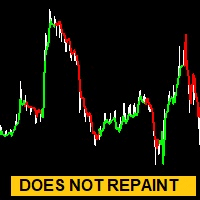
Point Trend Point is an MT5 indicator that plots blue and red dots on the chart to mark possible trend turns and sharp directional moves. It is meant as an aid for finding entry and exit areas, not as an automated trading system.
Get one message the moment it launches, with its price.
Point Trend Point is a MetaTrader 5 indicator that marks possible turning points and sharp directional moves with coloured dots drawn on the price chart. A blue dot points to a potential buy area and a red dot to a potential sell area, which gives a quick visual read of the current market state.
The indicator is based on the rate of change in price and on the search for extreme points. When price momentum shifts enough to suggest a reversal, or a strong push to one side, a dot appears on the chart. The aim is to help you see when a trend may be starting, continuing or running out of strength, so you can look for entries and exits with more context.
Dots are not orders. They are prompts to look more closely at the chart, the surrounding structure and your own plan.
The indicator can be attached to any symbol and timeframe offered by your MT5 broker, including forex pairs. Lower timeframes tend to produce more dots and more noise, while higher ones give fewer, slower signals. Test several combinations on a demo account and keep notes on how the dots behaved before you use them with real funds.
Input names and default values can differ between releases, so open the inputs tab after loading it and read each parameter. Typically you can expect options in these areas:
| Area | What to check |
|---|---|
| Calculation period | Controls how sensitive the dots are to price changes |
| Alerts | Whether pop-up, sound or push notifications are offered |
| Colours and size | Appearance of the buy and sell dots |
If a setting is not listed here, refer to the input window rather than assuming a value.
Trading carries risk, and you can lose some or all of your capital. Past results of any indicator do not predict future ones. Signals can be late, wrong or missing in fast markets, so test on a demo account first and never risk money you cannot afford to lose.
If it does not appear, confirm that you are using MT5 and not MT4, and that the file sits in the correct folder.
| Product type | Indicator |
|---|---|
| Platform | MetaTrader 5 (MT5) |
| Strategy focus | Trend |
| Delivery | Download from your account after purchase |
| License key | Not needed |
| Status | Launching soon |
| Category | Indicator |
| Strategy type | Trend and reversal detection |
| Signal display | Blue dot for buy, red dot for sell |
| Markets | Forex pairs and other symbols available in MT5 |
| Timeframes | Any; test on your chosen timeframe first |
| Trading | Manual; the indicator does not open or close orders |
| Requirements | MT5 terminal on desktop; check your broker offers charts for your symbol |
No reviews yet. Customers who own Point Trend Point can review it here.
No. It is an indicator, so it draws dots on the chart and, where the alert option is available, can notify you. You decide whether to open or close any trade and manage the position yourself.
No. This version is built for MetaTrader 5 only. An MT4 terminal cannot load it, so make sure you use MT5 before buying.
The indicator reads price data, so it can be attached to any symbol and timeframe your MT5 broker provides. Behaviour differs between instruments and timeframes, so test it on a demo account with the markets you plan to follow before relying on it.
Open MT5, choose File and then Open Data Folder, go to MQL5 and then Indicators, and copy the downloaded file there. Restart the terminal or refresh the Navigator, then drag the indicator onto a chart.
No indicator can guarantee outcomes. Check on a demo chart how the dots behave on closed and forming candles, and treat each signal as one input alongside your own analysis and risk limits.
Point Trend Point
Notify me at launchQuestions about this tool?
Ask us on Telegram Install guide for MT4 and MT5 Get a custom version builtFree, practical help with testing, sizing and running indicators.
More MT5 tools with a similar focus.





Own Point Trend Point? Sign in to review it.