

Available soon
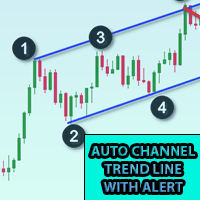
An MT5 indicator that draws an automatic trend channel from ZigZag swings and sends alerts when price touches the upper, middle or lower line. Alerts can be paused, offset by points and sent to the terminal, phone or email.
Get one message the moment it launches, with its price.
Auto Trend Line Channel with Alert is an MT5 indicator that builds a trend channel for you and tells you when price reaches it. Instead of redrawing lines by hand and watching the chart all day, you set the swing sensitivity, let the channel appear, and wait for a notification.
The channel is derived from ZigZag swing points. The ExtDepth input controls how large a swing must be to count, so it decides how wide and how stable the channel looks. The indicator then draws an upper line, a lower line and a middle line between them. When price touches any of these lines, an alert can be raised.
A button on the chart pauses or releases the channel. A common workflow is to try different ExtDepth values, stop when the channel fits the swings you can see, freeze it, and wait for an alert. You can then look at candle patterns or other price action before deciding what to do.
The indicator works on any symbol and timeframe that MT5 can chart. Short timeframes usually call for a larger ExtDepth value, while hourly charts often work with a smaller one. Treat these as starting points only and check the result on your own symbols.
Input names can differ slightly, so read the inputs tab after attaching the indicator. The main groups are:
| Setting | Purpose |
|---|---|
| ExtDepth | Sensitivity of the ZigZag swings that shape the channel |
| Line alerts | Enable or disable upper, middle and lower alerts |
| Pause after alert | Seconds to wait before another alert can fire |
| Early alert points | Distance in points before the line at which to alert |
| Directional touches | Only alert on touches from the expected side |
| Time zone | GMT or local time, matching your chart |
| Appearance | Colour, style and width of the lines |
| Notification type | Terminal alert, push, email or print |
Push and email alerts need to be configured in the MT5 options before they will arrive. The points value depends on how many digits your symbol uses, so test with a small offset first.
Trading carries risk, and past results do not predict future ones. A trend channel is a visual aid, and price can break through or ignore any line. Test on a demo account first and use your own risk management.
| Product type | Indicator |
|---|---|
| Platform | MetaTrader 5 |
| Strategy focus | Trend, Support and resistance |
| Delivery | Download from your account after purchase |
| License key | Not needed |
| Status | Launching soon |
| Category | Indicator with alerts |
| Strategy tags | Trend, support and resistance |
| Markets | Any symbol available in your MT5 terminal |
| Timeframes | All; ExtDepth is tuned per timeframe |
| Trade style | Manual; the indicator does not place trades |
| Alert channels | Terminal alert, push notification, email, print to log |
| Requirements | Chart time zone set correctly; push and email need setup in MT5 |
No reviews yet. Customers who own Auto Trend Line Channel with Alert can review it here.
No. It is an indicator, not an expert advisor. It draws a trend channel and notifies you when price reaches a line. You decide whether to trade and handle entries, exits and position size yourself.
This listing is the MetaTrader 5 build. It will not load in MetaTrader 4, so make sure your broker account runs on MT5 before buying.
In MT5 choose File, then Open Data Folder, and copy the indicator file into MQL5/Indicators. Restart the terminal or refresh the Navigator, then drag the indicator onto a chart and allow the inputs window to open so you can set your options.
ExtDepth controls how sensitive the underlying ZigZag swings are. A higher value gives fewer, wider swings and a smoother channel. Many users start with a larger value on 1 to 5 minute charts and a smaller one on 1 to 4 hour charts, then adjust by eye. Test on a demo account to see what suits your symbol.
The indicator needs to know whether your chart times are in GMT or in your local time so that it can place the channel correctly. Choose the option that matches your broker's chart and check that the lines sit where you expect.
Yes. You can attach it to as many charts as your terminal handles and receive alerts for different symbols. Use different settings per chart if needed, and keep the pause between alerts sensible to avoid a flood of messages.
Auto Trend Line Channel with Alert
Notify me at launchQuestions about this tool?
Ask us on Telegram Install guide for MT4 and MT5 Get a custom version builtFree, practical help with testing, sizing and running indicators.
More MT5 tools with a similar focus.




Own Auto Trend Line Channel with Alert? Sign in to review it.