

Available soon
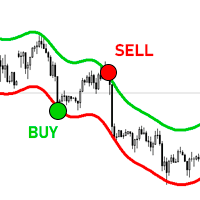
A MetaTrader 5 indicator that fits a kernel-smoothed trend line to recent prices and draws upper and lower envelopes around it. Triangles and alerts mark crosses of the outer bands, and the tool takes a contrarian approach.
Get one message the moment it launches, with its price.
The Nadaraya-Watson envelope is a chart overlay for MetaTrader 5 that estimates the underlying price path with kernel smoothing and wraps an upper and lower band around it. When price crosses one of the outer bands, the indicator places a triangle on the chart and can send an alert.
The indicator takes a recent window of price data and fits a smooth curve to it using Nadaraya-Watson kernel regression. Recent and nearby bars are weighted according to a bandwidth value, which controls how closely the curve follows price. The tool then measures the mean absolute deviation of price from that curve and adds and subtracts a multiple of it to build the upper and lower envelopes.
The logic is contrarian. A cross of price beyond an envelope is read as a stretched move that may revert toward the smoothed line, not as a breakout to follow. This can fit range-bound conditions, but it can perform poorly when a strong trend keeps price outside the bands for long stretches.
Because the curve is refitted to the latest window of prices, the envelopes on recent bars can change as new bars form. Treat the band shape on past bars as an approximation, and judge the tool by what you would have seen in real time, not only by how clean the history looks.
The indicator works on any symbol and timeframe your MT5 terminal offers, including forex pairs, indices, metals and others. Volatility and spreads differ between markets, so the envelope width that suits one instrument may be too tight or too loose for another. Test before relying on it.
| Input | What it does |
|---|---|
| Window Size | Number of recent price observations used to fit the estimator. |
| Bandwidth | Smoothness of the envelopes; higher values give a smoother result. |
| Mult | Multiplier that sets the envelope width. |
| Src | The price source the calculation uses, such as close. |
Default values are not listed here, so check the Inputs tab after attaching the indicator and adjust from there. Alert options may also appear in the same tab.
Trading carries risk, and past results do not predict future ones. This indicator is an analysis aid, not a promise of any outcome. It repaints and has no performance claims behind it, so use it alongside other methods and test on a demo account before using real funds.
| Product type | Indicator |
|---|---|
| Platform | MetaTrader 5 |
| Strategy focus | Trend, Support and resistance |
| Delivery | Download from your account after purchase |
| License key | Not needed |
| Status | Launching soon |
| Category | Indicator (chart overlay) |
| Method | Nadaraya-Watson kernel smoothing with mean absolute deviation bands |
| Trade style | Contrarian, looks for price stretched beyond the envelope |
| Markets | Any symbol available in your MT5 terminal |
| Timeframes | Any timeframe; test the settings on the one you trade |
| Inputs | Window Size, Bandwidth, Mult, Src |
| Behaviour | Envelopes can repaint; triangles are kept as a record |
No reviews yet. Customers who own Nadaraya Watson envelope for MT5 can review it here.
Yes. The envelopes are refitted to the most recent window of prices, so the bands on recent bars can shift when new data arrives. The triangle labels are kept where they first appeared, so you can review earlier signals, but the band shape you see now may differ from what was visible at that moment.
This version is built for MetaTrader 5. It will not load in MetaTrader 4, so check which platform your broker account uses before buying.
It is better treated as one input among several. It looks for price extremes and expects reversals, which can fail in strong trends. Combine it with your own trend filter, support and resistance levels and risk rules, and test on a demo account first.
Copy the indicator file into the Indicators folder through File, then Open Data Folder, then MQL5, then Indicators in MetaTrader 5. Restart the terminal or refresh the Navigator, then drag the indicator onto a chart and adjust the inputs.
The defaults are a starting point only. Check the Inputs tab for the values supplied with your copy, then test different window sizes, bandwidths and multipliers on the symbol and timeframe you trade. Wider multipliers give fewer crosses; smaller ones give more.
Nadaraya Watson envelope for MT5
Notify me at launchQuestions about this tool?
Ask us on Telegram Install guide for MT4 and MT5 Get a custom version builtFree, practical help with testing, sizing and running indicators.
More MT5 tools with a similar focus.






Own Nadaraya Watson envelope for MT5? Sign in to review it.