
Available soon
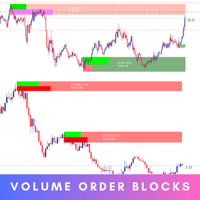
Volume Order Blocks is an MT5 indicator that draws bullish and bearish order block zones on the chart and shows the volume inside each one. It supports multi-timeframe display and zone alerts.
Get one message the moment it launches, with its price.
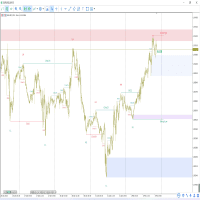
Volume Order Blocks is an indicator for MetaTrader 5 that marks bullish and bearish order block zones on your chart and adds volume information to each one. It is meant to help you judge which zones may matter more, not to give automatic buy or sell instructions.
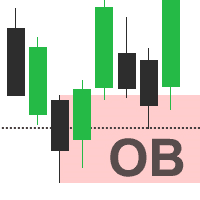
An order block is a price area where a notable burst of activity occurred before price moved away from it. Many traders treat these areas as possible support or resistance when price returns. The indicator detects such areas from swing structure on the chart and draws them as coloured zones, with separate styling for bullish and bearish blocks.
What sets it apart from a plain order block drawing tool is the volume layer. When volume information is switched on, each zone can display its total volume and the ratio between bullish and bearish volume. The strength of a block is assessed by comparing the volume of the most recent bars in the formation with the volume of the oldest bar, with the comparison reversed for bearish blocks. A zone with a lopsided ratio may deserve more attention than one with an even split, but this is context rather than a signal.
The indicator can be attached to any symbol and timeframe available in MT5. The multi-timeframe option lets you display zones from a higher timeframe on a lower timeframe chart, which is useful for seeing where short-term price sits relative to larger areas. Volume figures depend on what your broker supplies. On many forex and CFD symbols this is tick volume, so numbers can vary between brokers.
Exact defaults and input names can differ, so open the inputs tab after attaching the indicator and review each option. The main groups are listed below.
| Setting | What it controls |
|---|---|
| Volumetric info | Turns the volume and ratio display inside zones on or off |
| Zone invalidation | Uses the wick or the close price to decide when a zone is broken |
| Swing length | Sets how sensitive block detection is; smaller values find smaller blocks |
| Historic zones | Shows or hides zones that have already been invalidated |
| Multi-timeframe | Selects a different timeframe from which to draw zones |
| Alerts | Entry, break and retest notifications |
| Styling | Colours and appearance of the zones |
Trading carries risk and you can lose money. Past results do not predict future ones. Order block zones are an analysis aid, and price can pass through them without reacting. Test the indicator on a demo account and use your own stop placement and position sizing.
Before using it on a live account, check how the volume data from your broker looks on the symbols you trade, and try different swing length values to find a level of detail that suits your style.
| Product type | Indicator |
|---|---|
| Platform | MetaTrader 5 (MT5) |
| Strategy focus | Trend, Support and resistance, Volume |
| Delivery | Download from your account after purchase |
| License key | Not needed |
| Status | Launching soon |
| Category | Indicator (no automatic trading) |
| Strategy tags | Trend, support and resistance, volume |
| Markets | Any symbol that provides volume data from your broker |
| Timeframes | All standard MT5 timeframes, plus a multi-timeframe option |
| Alerts | Zone entry, zone break and retest of a broken zone |
| Key inputs | Swing length, zone invalidation method, volume info, historic zones |
| Requirements | MT5 terminal and a chart with price and volume history loaded |
No reviews yet. Customers who own Volume Order Blocks MT5 can review it here.
No. It is a chart indicator that draws zones and shows volume information. It does not open, manage or close trades. Any trading decision, entry, stop and position size remains yours.
This listing is the MT5 build and only runs in MetaTrader 5. The MT4 platform needs a separate MT4 build of the product, so check that the platform shown on the page you buy from matches your terminal.
It can be attached to any symbol and timeframe in MT5 as long as the chart has enough price and volume history. Volume on some CFD, forex and index symbols is tick volume rather than traded volume, so the readings can differ between brokers. Test on your own broker's data first.
Open the indicator inputs and adjust the swing length. Smaller values usually find smaller blocks and produce more zones, larger values give fewer and broader ones. You can also hide historic zones and turn volume information on or off.
The inputs include alerts for price entering a zone, price breaking a zone and price retesting a broken zone. Enable the ones you want, and make sure alerts and notifications are allowed in your MT5 terminal options.
No. Order block zones are an analysis aid and price can move through them. Trading carries risk and past results do not predict future ones, so test on a demo account and combine the tool with your own risk management.
Volume Order Blocks MT5
Notify me at launchQuestions about this tool?
Ask us on Telegram Install guide for MT4 and MT5 Get a custom version builtFree, practical help with testing, sizing and running indicators.
More MT5 tools with a similar focus.






Own Volume Order Blocks MT5? Sign in to review it.