
Available soon
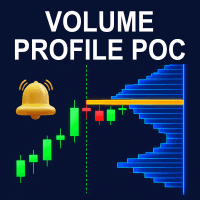
Volume Profile POC is an MT5 indicator that draws a volume profile on the chart and marks the point of control and the value area high and low. It can also show past profiles, POC lines and optional alerts.
Get one message the moment it launches, with its price.
Volume Profile POC is an indicator for MetaTrader 5 that shows where trading activity has been concentrated across price. It draws the profile as horizontal bars on the chart and highlights the point of control, which is the price level with the most volume in the period being analyzed.
The indicator builds a volume profile from the symbol's data and anchors it to the right edge of the chart, with the bars growing to the left. The point of control is drawn in a separate color so it stays easy to find. Many traders watch this level as a possible area of support or resistance, although price does not have to react to it.
The calculation window follows the chart timeframe, so the profile stays readable when you switch views:
The indicator can be attached to any symbol and timeframe in MT5. Results depend on the quality of the volume data your broker provides, which is normally tick volume for forex and CFDs. Check how the profile looks on the symbols you trade before relying on it.
Exact input names and defaults can differ, so review the Inputs tab after attaching the indicator. The main areas are:
| Area | What it controls |
|---|---|
| Stretch mode | Manual uses a draggable vertical line to set bar length; Automatic uses the chart shift space as the limit. |
| Historical profiles | Whether profiles for earlier periods are drawn. |
| POC day lines | How many previous days get a line, plus color, style and thickness. |
| Estimated tick delta | Turns the pressure coloring on or off, with options for intensity, neutral threshold and colors. |
| Alerts | Price crossing the POC, the POC moving to a new level, or price leaving the POC zone, sent by pop-up, sound or mobile push. |
A volume profile describes what has already happened. It does not forecast what price will do next, and a high-volume level can fail like any other. Use it alongside your own analysis and position sizing, and test any approach on a demo account first.
Trading carries risk, and past results do not predict future ones. This indicator is an analysis aid and does not remove the possibility of loss.
If the chart looks incomplete at first, give the terminal a moment to synchronize history for the symbol. The indicator is designed to retry on its own while data loads.
| Product type | Indicator |
|---|---|
| Platform | MetaTrader 5 (MT5) only |
| Strategy focus | Support and resistance, Volume |
| Delivery | Download from your account after purchase |
| License key | Not needed |
| Status | Launching soon |
| Category | Indicator (not an automated trading system) |
| Strategy tags | Support and resistance, volume |
| Markets | Any symbol that has tick or volume history in MT5 |
| Timeframes | M1 to MN1; the profile period adapts to the timeframe |
| Trade style | Discretionary analysis of volume-based price levels |
| Alerts | Pop-up, sound and mobile push, depending on your terminal setup |
| Requirements | MT5 terminal with synchronized symbol history |
No reviews yet. Customers who own Volume Profile POC can review it here.
No. This product is built for MetaTrader 5 and will not load in MT4. If you trade on MT4, look for a product listed for that platform instead.
No. It is a charting tool. It draws the volume profile, the point of control and the value area levels, and can send alerts. Any trading decision and order placement remain yours.
No. MT5 usually supplies tick volume, not true bid and ask aggressor volume. The optional delta coloring is an estimate based on the direction of price from tick to tick, so treat it as a rough guide only.
Copy the indicator file into the Indicators folder of your MT5 data directory (File, Open Data Folder, MQL5, Indicators), restart the terminal or refresh the Navigator, then drag the indicator onto a chart.
It should load on any broker that provides MT5, but the profile depends on the history and tick data your broker supplies. Load a few days of history on the symbol first and compare the result on a demo account.
Volume Profile POC
Notify me at launchQuestions about this tool?
Ask us on Telegram Install guide for MT4 and MT5 Get a custom version builtFree, practical help with testing, sizing and running indicators.
More MT5 tools with a similar focus.





Own Volume Profile POC? Sign in to review it.